By the VixQR team · published on · 9 min read
Static vs Dynamic QR Codes: Which One Do You Actually Need?
Dynamic QR codes are editable and trackable, and die when you stop paying. The honest comparison, plus how to get editable destinations for free.
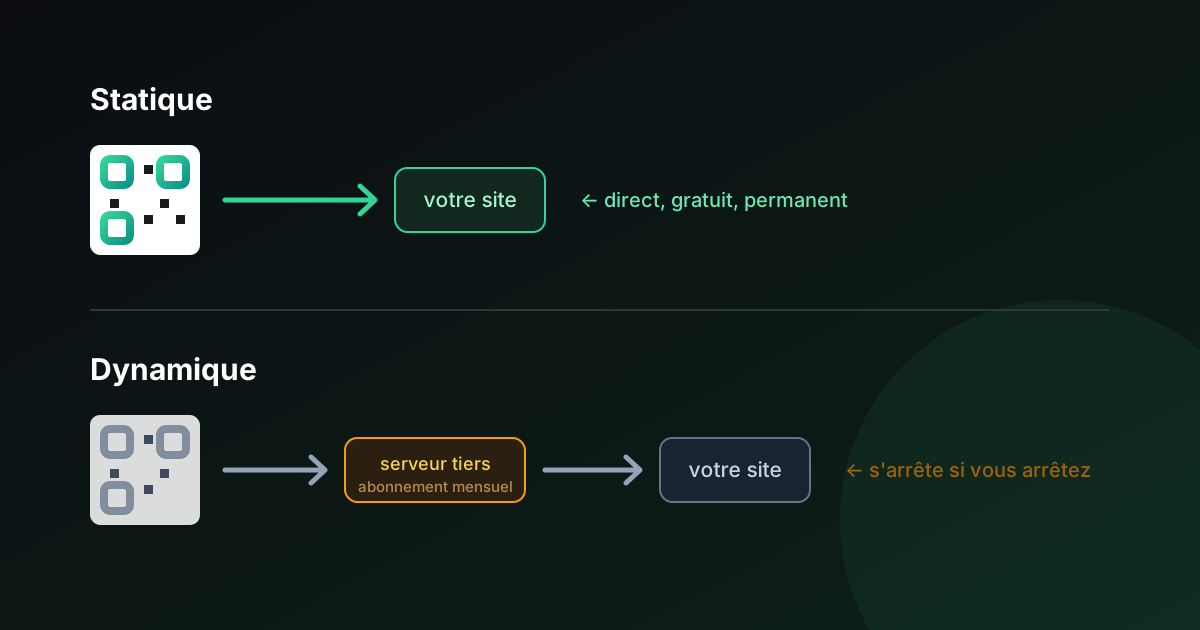
Nearly every QR code generator pushes you toward dynamic codes. There's a straightforward reason: dynamic codes require a subscription, and static ones don't.
That doesn't make dynamic codes a scam — they solve a genuine problem. But the choice is presented dishonestly often enough that it's worth laying out plainly.
The actual difference
A static QR code encodes your destination directly in the pattern. The URL, the WiFi password, the contact details — the information is the arrangement of black and white squares. Scanning it reads the data straight off the paper. No server is involved at any point.
A dynamic QR code encodes a short redirect URL belonging to the generator's service, something like qr.example.com/a7f3k. Scanning it hits that server, which looks up where you've told it to point today, and forwards the phone there. The visible pattern never changes; the destination behind it can.
Everything else follows from this one structural difference.
Side by side
| Static | Dynamic | |
|---|---|---|
| Cost | Free, permanently | Subscription, typically €5–30/month |
| Edit destination after printing | No | Yes |
| Scan analytics | No | Yes |
| Expires | Never | When you stop paying |
| Depends on a third party | No | Yes |
| Pattern density | Grows with content length | Always simple (short redirect) |
| Works offline | Yes (WiFi, vCard, text) | No — always needs a network |
| Destination can be changed by someone else | No | Yes, by whoever controls the account |
What dynamic codes genuinely give you
Editable destinations. This is the real one. If you print 10,000 catalogues pointing at a seasonal landing page, a dynamic code lets you repoint them next season without reprinting. For print runs that outlive their destination, that's worth paying for.
Scan analytics. Because every scan passes through their server, you get counts, timestamps, rough location, and device type. Useful for measuring which placement works — a window decal versus a table card versus a receipt.
A short, simple pattern. A redirect URL is always brief, so the code stays sparse and easy to scan even when the real destination is a long URL stuffed with tracking parameters.
Retargeting by placement. Point one code at different destinations by time of day, or track each print placement separately with its own short link.
If you're running paid campaigns and need attribution, or printing at volume against destinations that will change, these are real benefits. Pay for them.
What the sales pages don't emphasise
Your codes stop working when you stop paying. This is the part that catches people. A dynamic code is not yours in any meaningful sense — it's a redirect entry in someone else's database. Cancel the subscription, miss a renewal, or have the company shut down, and every printed code becomes a dead link. Not a code pointing somewhere old: a broken one.
This has happened repeatedly to businesses that printed dynamic codes on permanent signage, packaging, or vehicle livery during a free trial, then discovered months later that the trial had lapsed.
"Free" often means a 14-day dynamic trial. Many generators advertise free QR codes, generate dynamic ones by default, and let the codes die when the trial ends. If you plan to print anything, check whether the code you just downloaded is static or dynamic before it goes to press.
Someone else can change your destination. Whoever controls that account controls where your printed codes send people — including an ex-employee with lingering access, or an attacker who compromises the account. A static code has no such surface: the destination is physically encoded in the ink.
Every scan needs a network round trip. Static WiFi and vCard codes work with no connectivity at all, because the data is in the pattern. A dynamic code always requires the phone to reach the redirect server first. In a basement restaurant with poor signal, that's a real failure mode.
When to choose which
Choose static when:
- The destination is stable — your homepage, a WiFi network, contact details
- The code goes somewhere permanent: signage, engraving, packaging, a business card
- You're encoding something that isn't a URL at all (WiFi credentials, a vCard, plain text, a phone number)
- You want zero recurring cost and zero dependency on a company continuing to exist
- Privacy matters and you'd rather no third party logged every scan
Choose dynamic when:
- The destination will genuinely change while the printed material stays in circulation
- You need scan analytics for campaign attribution
- You're running A/B tests or time-based routing
- You're printing at a volume where reprinting costs more than the subscription
The middle path most people miss
You can get an editable destination without a QR subscription, and it costs nothing extra if you already own a domain.
Create a static QR code pointing at a URL you control — say yourdomain.com/menu. Then set up a redirect on your own site from that path to wherever the content actually lives. You change the redirect; the printed code keeps working.
You get the flexibility of a dynamic code, with three advantages: no monthly fee, no third party who can change or lose your destination, and no code that dies when a subscription lapses. Your web host's analytics give you scan counts too, if you want them.
The requirement is owning a domain and being able to configure a redirect — a few minutes of work in most hosting control panels or a single line in a Next.js, Apache, or Nginx config. For anyone who already runs a website, this is strictly better than renting a redirect from a QR vendor.
The codes that can't be dynamic at all
A distinction that gets deliberately blurred in vendor comparison tables.
"Dynamic" only means anything when what you're encoding is a URL. Several of the most common QR types don't encode URLs at all — they encode the data itself:
- WiFi credentials — network name, security type, password
- vCard contact details — name, phone, email, company
- Plain text
- A phone number or SMS
- Geographic coordinates
- Calendar events
For all of these, the information is the pattern. There's nothing to redirect, because no URL was involved. These codes work with the phone in airplane mode, in a basement, on a plane, in a country with no roaming — because no network request happens at any point.
Now watch what vendors do with this. Sold a "dynamic vCard" or a "dynamic WiFi code", what you actually get is a URL to a hosted page on their servers, which then displays or downloads the contact details. That is a categorically different product:
- It requires a working internet connection to do something that needed none.
- It routes your guests' and contacts' details through a third party.
- It stops working entirely when the subscription lapses — and a business card is exactly the artefact that circulates for years.
- It adds a page of friction between the scan and the result.
There are legitimate reasons to want a hosted contact page — analytics, an updatable profile, a richer landing experience. But it should be a deliberate choice, not something you bought thinking you were getting a better version of a vCard code.
If you're encoding WiFi, contact details, or plain text: static isn't the cheap option, it's the correct one.
Setting up your own redirect, concretely
"Configure a redirect" is the kind of instruction that sounds simple to whoever writes it and vague to everyone else. Here's what it actually looks like on the platforms most people are on.
Shared hosting with cPanel or Plesk. There's a Redirects tool in the control panel. Enter the source path (/menu), the destination URL, choose permanent (301) or temporary (302), and save. No files touched, no command line. Two minutes.
Vercel or Netlify. Add a redirect rule to your config. On Vercel that's a redirects entry in vercel.json; on Netlify it's a line in a _redirects file:
/menu https://yourdomain.com/spring-menu 302
Next.js. A redirects() function in next.config.js returning source, destination and permanent: false.
Apache. One line in .htaccess:
Redirect 302 /menu https://yourdomain.com/spring-menu
Nginx. A location block with a return 302.
WordPress. Any redirect plugin gives you a source-and-destination form. Some themes and SEO plugins include one already.
Which status code? Use 302 (temporary) for anything you might change again — a menu, a campaign, a seasonal page. A 301 tells browsers and search engines the move is permanent, and browsers cache it aggressively, which means some visitors keep going to the old destination for a long time after you change it. For a printed code whose whole point is being repointable, 302 is the right default.
One habit that saves trouble later: create the redirect path before you generate the code, and use short, meaningful paths — /menu, /q/flyer, /wine. You'll want them to be typeable, because printing the URL next to the code is good practice anyway.
What five years actually costs
The monthly fee looks small in isolation. Set against the alternative, over the life of a printed run:
| Dynamic subscription | Your own redirect | |
|---|---|---|
| Year 1 | €60–360 | €0 (domain already owned) |
| Year 5 cumulative | €300–1,800 | €0 |
| Setup effort | Account signup | 2–10 minutes, once |
| Codes if you stop paying | Dead | Still working |
| Who can change the destination | You and the vendor | You |
| Survives vendor bankruptcy | No | Yes |
The asymmetry that matters isn't the money. It's the last two rows.
The migration problem
Here's the scenario people don't plan for, and it's the strongest argument in this whole article.
You've printed 10,000 codes pointing at qr.vendor.com/a7f3k. Two years later the vendor doubles its price, gets acquired, degrades, or shuts down.
You cannot migrate. The redirect domain isn't yours. The short code isn't yours. There is no export that helps, because the thing encoded in 10,000 pieces of printed material is their URL. Your only options are to keep paying whatever they ask, or reprint everything.
A subscription you can't leave isn't a subscription, it's a hostage situation — and it's created at the moment of printing, silently, by a decision that felt trivial at the time.
With a redirect on your own domain, migration is changing one line. The printed codes never knew the difference.
This is also why "non-expiring code guarantees" are worth so little. They're a promise from a company about a dependency that company created. A URL on a domain you own needs no guarantee.
What about analytics?
The other reason people pay for dynamic codes is scan tracking — and that's also solvable without a subscription. Point each placement at its own path (/flyer, /window, /poster-a), and count visits with whatever analytics you already run. You get per-placement attribution, which is exactly the feature being sold.
We go through the three free methods, including their limits, in tracking QR codes without a subscription.
The short version
Dynamic codes solve one problem — changing a destination after printing — and charge a subscription for it. If you have that problem at scale, they're a reasonable purchase.
Most people don't have that problem. A WiFi code for a guest room, contact details on a business card, a link to a menu that lives at a stable address: none of these need a monthly fee, and all of them are better served by a code that can't expire.
And if you do have that problem, check whether you can solve it on your own domain first. The feature you're being sold — a changeable destination — is a redirect, and you almost certainly already own somewhere to put one. What the subscription really buys is not having to set it up, which is a fair trade for some people and a poor one for anyone printing something meant to last.
VixQR generates static codes only, free and without an account. Everything is produced in your browser — WiFi passwords, contact details, and links never reach a server — and the codes you export will work for as long as the destination does.